Booking Notes and Catering Items can include external hyperlinks - to things such as a menu, a form, or a notice - in "markdown" format (note that HTML is not supported).
This only applies in the specific situations below:
- Booking note and catering item Names
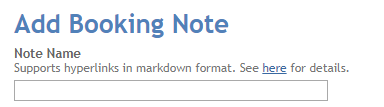
- Label type booking notes and catering items (you select a note type when creating a note).
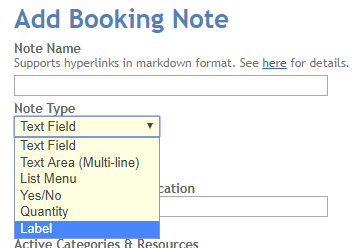
How to add a hyperlink
To add hyperlinks use the following formatting:
[Visible text](actual hyperlink)
The first part, in square brackets, defines the text shown to your users. The second part, in round brackets, defines the target that the text will act as a link to when it is clicked. Make sure there is no space between the final square bracket and the first rounded bracket.
For example, you could enter the following as a label name:
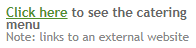
[Click here](https://school.domain/menu.html) to see the catering menu
This would show the following in the booking pop-up which appears in the calendar:
Was this article helpful?
That’s Great!
Thank you for your feedback
Sorry! We couldn't be helpful
Thank you for your feedback
Feedback sent
We appreciate your effort and will try to fix the article